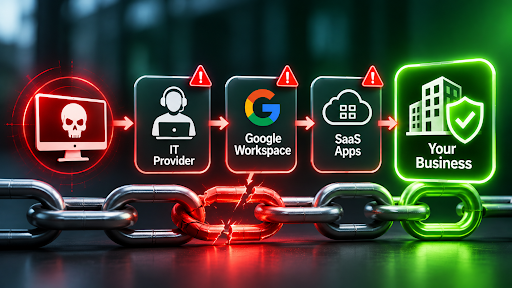
Supply chain cyber attacks are now one of the quickest ways for criminals to break into Australian businesses. Instead of attacking you directly, they breach a supplier you already trust. Then they walk in through the door you opened for that supplier.
The numbers show how fast this is growing. Verizon’s 2026 breach report found that third parties played a part in 48% of breaches. That figure was 30% a year earlier. Meanwhile, ASD’s Australian Cyber Security Centre says supply chain weaknesses keep giving criminals new openings.
This guide explains how supply chain cyber attacks work and which recent breaches matter most. You will also learn what small and medium businesses can do about them. Special attention goes to IT providers, Google Workspace partners and SaaS apps, because most businesses overlook them. Sentry Cyber, an Australian cyber security company in Melbourne, wrote it.
Key takeaways on supply chain cyber attacks
- Supply chain cyber attacks breach a supplier first, then use that trust to reach you.
- Third parties now feature in almost half of all breaches, according to Verizon.
- IT providers, SaaS apps and Google Workspace partners often hold more access than they need.
- Instead, use just-in-time access, so your provider only gets in when you approve it.
- A regular review of your SaaS apps also closes a gap that attackers actively target.
What are supply chain cyber attacks?
Supply chain cyber attacks happen when criminals breach a supplier and use that access to reach the supplier’s customers. The supplier could be an IT provider, a software vendor, a cloud app or even a call centre.
Supply chain cyber attacks work because trust travels. Your supplier already has a login, a connection or a data feed into your business. So when criminals breach the supplier, they inherit that access.
Verizon groups third-party breaches into three types. The vendor might supply your software, host your data or connect straight into your systems. Either way, you rely on someone else’s security.
For small and medium businesses, the risk is bigger than it looks. You can’t patch your supplier’s systems, and you rarely see their settings. However, you can control how much access they hold. That is where most of your protection comes from.
Recent supply chain cyber attacks and what they cost
The past two years have produced plenty of examples. These five supply chain cyber attacks show how a supplier’s problem quickly becomes yours.
Amadeus: one travel supplier, many airlines
In early November 2026, travel technology provider Amadeus disclosed unauthorised access to a booking system. Japan Airlines, Cathay Pacific and other airlines then confirmed the breach exposed customer booking details.
Qantas told Information Age that Amadeus had notified it. It also said it was working to understand any impact on its bookings. Its own systems were not affected. Supply chain cyber attacks like this let one supplier expose many well-known brands at once.
Instructure: a school platform exposes Queensland students
In May 2026, the criminal group ShinyHunters claimed a breach of Instructure, the company behind the Canvas learning platform. Queensland’s Department of Education then confirmed the breach reached its QLearn platform. It touched students and staff who have used the platform since 2020.
The education minister said the breach compromised names, email addresses and school locations. ShinyHunters claimed it reached nearly 9,000 schools worldwide. The breach happened at the supplier. Even so, Queensland schools still had to contact families.
TeamPCP: poisoned software tools reach 1,000 organisations
In 2026, a group called TeamPCP allegedly hid malicious code inside trusted open-source software and developer tools. Police estimate the code may have hit more than 1,000 organisations. It also let the group steal over 500,000 logins and at least 300 gigabytes of data.
Police allege two Western Australian men belong to the group. The Australian Federal Police charged them in August. Our earlier guide to AI security and software supply chain attacks explains how the campaign began.
Salesloft Drift: stolen tokens open Salesforce databases
In August 2025, attackers stole access tokens from Drift, a chat app made by Salesloft. They then used those tokens to pull large amounts of data out of customers’ Salesforce accounts. Google’s threat team knew of more than 700 potentially affected organisations.
The attackers did not need to break into Salesforce. A trusted connection did the work for them. They also read email in a small number of Google Workspace accounts that used a Drift integration.
Marks and Spencer: a supplier trick that cost £300 million
In April 2025, attackers targeted Marks and Spencer through a third party. The retailer said they used social engineering to get in. M&S paused online orders for weeks and estimated a hit of about £300 million to its operating profit.
The lesson here is simple. A supplier’s people can be the weakest door into a well-defended brand.
How supply chain cyber attacks usually happen
Most supply chain cyber attacks follow one of six paths.
- Hackers breach an IT provider, then use its remote tools to reach every client.
- Criminals poison software updates or open-source code, so the malware looks like a normal update.
- Hackers steal tokens or passwords from a connected app, then log in as a trusted service.
- Social engineers also phone a helpdesk or call centre and talk their way into an account.
- Hackers may instead exploit unpatched flaws in software that a supplier hosts for you.
- Weak settings in SaaS apps, such as open app permissions, let attackers export data quietly.
Notice the pattern. In every case, the attacker skips your front door and uses a door you opened for someone else.
Why IT providers and MSPs are such big targets
A managed service provider (MSP) looks after IT for many clients at once. To do that, it holds powerful access to all of them. As a result, one breach can open dozens of businesses. That makes MSPs a favourite target for supply chain cyber attacks. ASD’s Australian Cyber Security Centre warns that hacking a single MSP can hit many of its customers.
The pattern is playing out right now. In November 2026, attackers broke into the ScreenConnect remote access systems that several MSPs use. They then pushed rogue remote access software onto client devices. Dozens of businesses felt the impact. In August, attackers also exploited a flaw in N-able’s N-central platform, which MSPs use to manage client computers.
Many businesses give their IT provider permanent admin rights to everything. It feels convenient, but it carries a cost. If a technician’s account or remote tool falls into criminal hands, your whole business goes with it.
Managed service provider security is not only your provider’s problem. It is your third-party cyber risk too. Besides, attackers know which tools MSPs use and how they usually secure their clients. So they hunt for whatever nobody checks.
How to limit IT provider access with just-in-time controls
The fix is not to fire your IT provider. Instead, stop giving them always-on access. That one change blunts many supply chain cyber attacks.
Just-in-time access means your provider gets in only when a task needs it. It lasts only as long as the job, and it covers only the systems involved. Everything else stays locked. Here is how to put that into practice.
- First, ask your provider to switch on user approval in their remote support tool. Then a technician can’t take control of a device until your staff member clicks accept. Many remote support tools include this setting.
- Next, remove standing admin rights. Give your provider normal accounts day to day, and raise their access for each job.
- Also insist on named accounts for each technician. Shared logins make it impossible to see who did what.
- Require strong multi-factor sign-in (MFA) on every provider account. Security keys and passkeys work best.
- Put an end date on every access grant, then review the full list each quarter.
- Finally, ask for logs. Your provider should be able to show you who connected, when and why.
If you use Microsoft 365, ask whether your partner works through granular delegated admin privileges (GDAP) with time-limited roles. The same principle applies. Likewise, the ACSC’s guide to hiring a managed service provider backs short access windows. It also asks for accounts that trace back to named staff.
How to make your Google Workspace partner licence-only (step by step)
If you buy Google Workspace through a Google partner, also called a reseller, check what access that partner holds. In our experience, the default setup gives the partner broad access to your Admin console. That happens when you transfer your subscription to a partner. It also happens when a partner sets up your account from scratch. Many owners never notice this Google Workspace reseller access.
Google’s help pages explain what that access allows. A reseller with Admin console access can add, change or delete users and groups. It can also manage licences and devices. In the wrong hands, that is enough to take over staff accounts.
Google suggests letting resellers troubleshoot, so there is a trade-off. Licence-only access protects you from supply chain cyber attacks that start at your partner. Then, when you need support, you open extra access on purpose.
Part 1: Switch your partner to licence and billing only
- First, sign in to the Google Admin console at admin.google.com as a super admin.
- Next, check who holds admin power today. Go to Account, then Admin roles, open Super Admin and read every name. Remove anyone who doesn’t need it.
- Make sure your business controls at least two super admin accounts, protected with security keys. That way, a mistake never locks you out.
- Go to Menu, then Account, then Reseller management. On older screens, look under Account settings, then Account management, then Reseller access.
- Under Access, turn Reseller access off and save. This switch removes Admin console access for every reseller on your account. Changes can take up to 24 hours, though they usually happen sooner.
- Confirm with your partner that they still manage your subscription and billing from their own partner console. Google says resellers can always do this, even with Admin console access off.
- After that, review Reporting, then Audit and investigation, then Admin log events. Look for changes your partner made to users, roles and settings.
- Finally, ask your partner to remove any admin accounts they created in your domain. Then reset passwords and recovery details on any admin account they touched.
Part 2: Create a restricted, just-in-time admin login
Sometimes your partner genuinely needs to help. For those jobs, give them a separate admin login that can only do the task at hand. Google’s free Cloud Identity edition lets you create that login without a mailbox or a paid Workspace licence.
- First, add Cloud Identity Free. In the Admin console, go to Billing, then Buy or upgrade, and look under Cloud Identity. Choose the free edition and follow the prompts. Menu names change, so check Google’s help pages if yours differ.
- Next, create an organisational unit for partner accounts. Under Directory, then Organisational units, add one named Partner admin.
- Turn off automatic licensing for that unit so new users don’t receive a paid Workspace licence.
- Then add a named account under Directory, then Users, such as partner-admin on your own domain. With no Workspace licence, it becomes a free Cloud Identity account with no Gmail or Drive.
- Go to Account, then Admin roles, and create a custom role with only the privileges the job needs.
- Assign the role with an expiry. Select the role, add the partner account, then choose Change expiration. Pick a short window, such as the day of the job. Google introduced expiring admin roles in September 2026, with a maximum of one year.
- Also protect the account. Require 2-Step Verification with a security key or passkey, and keep the account suspended until a job starts.
- Set alerts, so new admin role assignments and super admin sign-ins reach a real person.
- Finally, review every quarter, and delete accounts and roles you no longer need.
Want a hand? Sentry Cyber’s Google Workspace security services can help you lock these settings down. You can also download our free Google Workspace Security Playbook for more settings like these.
Why SaaS apps are the gap most businesses miss
Most IT providers focus on laptops, networks and email. SaaS apps often sit outside that scope. Examples include your CRM, helpdesk, accounting and marketing tools. In our experience, most IT providers and MSPs don’t review them as part of their standard service.
Attackers know this. They study which tools MSPs use and how they secure their clients. Then they go looking for whatever nobody checks. SaaS security is a big gap, and supply chain cyber attacks often run through SaaS apps. Salesforce shows why.
How supply chain cyber attacks reach your SaaS data
In 2025, a phone scam hit many Salesforce customers, including Qantas. A caller posed as IT help and talked a contact centre agent into approving a malicious connected app. The attacker stole no password, and no MFA prompt appeared. The app then ran bulk queries and pulled about 5.67 million customer records.
According to the privacy regulator’s report on the Qantas breach, the central weakness was a default Salesforce setting. It let any user approve a third-party app. Qantas had also required its contact centre provider to maintain ISO 27001 compliance. Even so, the attack worked. Salesforce has since changed the default.
The lesson applies to every SaaS app you use. Default settings, broad staff permissions and connected add-ons can let one tricked person expose a whole customer database. A breached vendor can do the same.
A simple SaaS app review you can start this week
- First, list every SaaS app your business uses, including apps that staff signed up for themselves.
- Next, find out who owns each app and who can connect new add-ons.
- Review connected apps and integrations. Remove any you no longer use or can’t explain.
- Limit who can export data or use the API, so one account can’t pull a whole database.
- Turn on single sign-on and MFA wherever the app supports them.
- Also switch on alerts for large exports, new app connections and new admin accounts.
- Finally, repeat the review every quarter, and again whenever a vendor reports an incident.
AI tools count too. Drift was an AI chat agent. Every AI add-on you connect to your email or CRM joins your supply chain too. Our AI security and risk assessment services can review them. For more detail, read our guides to SaaS security services in Australia and Chrome extension security.
How Sentry Cyber helps you stop supply chain cyber attacks
Sentry Cyber is an Australian cyber security company based in Docklands, Melbourne. We specialise in Google Workspace security. We help businesses find and fix the gaps that supply chain cyber attacks exploit, before attackers do.
Co-founder Adrian Cosman-Jones ran a managed service provider and Google Cloud Premier Partner for more than 18 years. So he knows how partner access works from the inside. Co-founder and CISO Anurag Adhikari is a certified ISO 27001 Lead Auditor.
We run risk assessments that check for the gaps supply chain cyber attacks use. Then we give you a report with clear steps to fix them. In our experience, most IT providers and MSPs don’t include this in their standard service. As a result, these gaps often stay open.
The Sentry 67 Google Workspace Cyberattack Risk Assessment is a good place to start. It checks 67 critical controls, informed by more than 200 real cyber incidents. The checks cover admin accounts, short-term admin rights and security alerts. They also cover outside apps that read Gmail and Drive, Marketplace apps and Chrome extensions. You receive a Cyber Risk Score, a risk heat map and a prioritised remediation roadmap. We use read-only access to your Google Workspace.
For a wider review, ask about our security assessment and security consulting. We also test and watch your defences with penetration testing, vulnerability assessments and security monitoring. If something goes wrong, incident response helps. Staff can learn through cyber awareness training, and we support compliance and certification too.
Frequently asked questions about supply chain cyber attacks
What are supply chain cyber attacks?
Supply chain cyber attacks are breaches where criminals hit a supplier first, such as an IT provider or cloud app. They then use that access to reach the supplier’s customers. The attacks work because customers already trust the supplier.
Why do attackers target IT providers and MSPs?
A managed service provider holds access to many clients. So one breach can open dozens of businesses at once. For that reason, MSPs are a common target for supply chain cyber attacks, as the Australian Cyber Security Centre notes.
What is just-in-time access?
Just-in-time access gives someone access only when a task needs it, for a limited time and with minimum permissions. When the job ends, the access ends too. As a result, a breached supplier has far less to abuse.
Should my Google Workspace partner have admin access?
Not by default. A partner can manage your subscription and billing from its own console without opening your Admin console. If they need to help, create a restricted admin login with an expiry date. Then remove it when the job ends.
How can small businesses reduce the risk of supply chain cyber attacks?
Start with access. List every supplier that can reach your systems, then remove always-on access, add approval steps and enforce MFA. Next, review your SaaS apps and connected add-ons. Finally, train staff and watch for unusual activity.
How do I check the security of my suppliers?
Ask for evidence, not promises. Request recent certificates or test reports. Also ask how the supplier limits access to your data. Then verify the answers with your own testing, because a certification alone did not stop the Qantas contact centre breach.
Who is a good cyber security company to help my business in Australia?
Look for a company that assesses your whole environment, including your IT providers and SaaS apps. It should explain findings in plain English and give you a prioritised fix list. Sentry Cyber, an Australian cyber security company based in Melbourne, offers this with a focus on Google Workspace. Our guide to choosing the right cyber security partner lists what to ask before you sign.
Final thoughts on supply chain cyber attacks
Supply chain cyber attacks will keep growing, because they give criminals a shortcut. You can’t stop every supplier breach. However, you can limit how far a breach travels. Cut standing access, lock down partner settings and review your SaaS apps. These steps make supply chain cyber attacks far harder to pull off.
Start this week. First, ask your IT provider how they approve remote sessions. Next, switch your Google Workspace partner to licence-only access. Then list your SaaS apps. After that, book a risk assessment to find what you missed.
Ready to find your gaps? Book the Sentry 67 Google Workspace Cyberattack Risk Assessment. You can also download the free Google Workspace Security Playbook, or call Sentry Cyber on 1800 526 269.