Many Australian organisation upgrade their office laptops, tablets, and servers every few years. However, what happens to the old hardware when it is no longer useful? Many business owners simply stack old computers in a back room or throw them into the general waste bin. This careless habit creates a massive security vulnerability for your organisation.
Therefore, implementing a secure IT asset disposal strategy is essential for protecting your sensitive business data. It helps your team avoid expensive data breaches. Furthermore, it ensures your company satisfies modern compliance standards.
Specifically, this practical guide breaks down the official requirements for the SMB1001 Gold 2026 standard. We will show you how to manage your retired hardware safely. As a result, you can protect your customers, satisfy regulators, and keep your business secure.
What is the SMB1001 Cybersecurity Certification?
The SMB1001 cybersecurity certification is an Australian framework built specifically for small and medium businesses. Dynamic Standards International created it to offer an affordable alternative to complex international security frameworks.
The framework features five progressive tiers running from Bronze up to Diamond. While the Bronze tier focuses on basic digital hygiene, the Gold tier introduces mature governance and risk management processes.
Importantly, the latest 2026 edition requires businesses to have formal, documented procedures for handling old hardware. You cannot simply guess your way through compliance anymore. Instead, you need a structured approach to electronic asset management to ensure no data is left behind.
Why You Need a Secure IT Asset Disposal Procedure
Every electronic device in your office stores information. For example, laptops, tablets, and even modern office printers keep copies of your files. If you discard these items improperly, hackers can extract your client records or financial data.
Consequently, a secure IT asset disposal procedure acts as your primary shield against physical data leaks. It outlines exactly how your team must handle hardware from the moment it becomes surplus.
Furthermore, relying on casual disposal channels like personal sales or informal gifting is highly dangerous. Businesses must treat every old device as an active security threat until it is completely sanitised. By establishing clear corporate rules, you eliminate the guesswork for your staff.
The Risks of Improper Hardware Management
Throwing away old electronics carelessly brings severe consequences for modern companies. Hackers look for discarded corporate hard drives to harvest passwords and corporate identities. A single leaked drive can result in a devastating ransomware attack.
In addition, your business could face massive fines. The Australian Privacy Commissioner penalises companies that fail to protect customer data.
Finally, improper disposal harms the environment. Computer parts contain toxic materials like lead, cadmium, and mercury. If you dump these items into a landfill, you violate local environmental protection laws.
The Core Phases of the Asset Disposal Process
Managing your end-of-life hardware requires a team effort. According to the SMB1001 Gold guidelines, the process follows three distinct administrative phases.
1. Identification and Evaluation
First, department managers must identify which assets are no longer required. They must submit a written request to the administration team.
Next, the technical team must assess the equipment. They determine if the device contains company data. In addition, they select the appropriate data sanitisation methods.
Finally, the finance team estimates the fair market value of the hardware. This step is necessary for tax write-offs or sales tracking.
2. Disposal Method Selection
Choosing the right path depends on the condition of the hardware. You should always consider options in a specific order of preference to reduce waste.
- Redeployment: This involves reusing the asset within another department. It is always the most cost-effective option.
- Sale: You can sell the hardware at a fair market value. However, management approval is required if the value exceeds your internal financial threshold.
- Donation: Giving the equipment to a registered Australian charity is an excellent alternative. You must collect a donation certificate for your financial records.
- Recycling: This involves sending the hardware to a certified e-waste provider.
- Physical Destruction: This remains the final option when the device cannot be saved or reused safely.
3. Disposal Execution
Once management approves the method, authorised staff can execute the plan. You must update your central asset register immediately.
Moreover, you must gather all receipts, disposal certificates, and destruction confirmations. Store these documents electronically to maintain a clear audit trail for future reviews.
Deep Dive into Data Sanitisation Methods
You must never let a device leave your premises while it still holds corporate data. Deleting files or formatting the drive is not enough. Sophisticated software can easily recover formatted files.
Therefore, you must use approved data sanitisation methods to overwrite or destroy the media completely. The SMB1001 Gold standard highlights four reliable options for businesses.
Physical Destruction
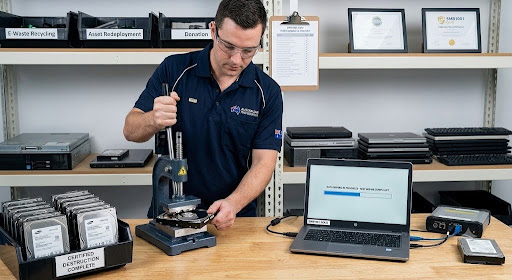
This method is highly recommended for old storage drives that you will never reuse. For example, technicians can drill multiple holes through the physical hard drive platters. As a result, the drive becomes permanently unreadable and completely inoperable. Authorised personnel must witness this process and document it carefully.
Data Erasing Softwar
If you plan to sell or donate the hardware, you should use professional overwriting software. Tools like KillDisk or DBAN write random patterns over your data. The software must run a minimum of three passes. Consequently, the original information becomes completely unrecoverable. You must save the generated erasure report.
Degaussing
This technique uses powerful magnets to disrupt the magnetic fields on older hard drives. It completely ruins the drive structure and erases all data instantly. You must obtain a formal degaussing certificate from the operator.
Certified Third-Party Destruction
Many businesses prefer to outsource their hardware disposal. However, you must only engage a certified provider. You must request a formal Certificate of Data Destruction for every single batch.
Environmental Responsibility and E-Waste Recycling
Australia
Throwing electronic equipment into general waste bins is illegal in many parts of Australia. E-waste contains hazardous materials that damage the environment.
Therefore, your company must use reputable recycling firms. Specifically, look for companies registered under the National Television and Computer Recycling Scheme (NTCRS). Another option is to take your usable electronic equipment to your local Office Works, they will accept up to 5 computers at a time for recycling.
By choosing a certified recycler, you protect the environment and avoid severe legal penalties. You can learn more about official e-waste regulations on the Australian Government Department of Climate Change, Energy, the Environment and Water website.
Regulatory Compliance and Record Keeping
A secure IT asset disposal policy keeps you compliant with several crucial Australian laws.
- The Privacy Act 1988 (Cth): This law mandates the secure destruction of personal data.
- The Corporations Act 2001 (Cth): This Act requires businesses to keep financial and disposal records for seven years.
- Work Health and Safety Act 2011 (Cth): This ensures your staff remain safe while handling heavy equipment.
Failure to maintain these records can expose your organisation to severe financial penalties. Always attach your destruction certificates directly to your digital asset register.
How Sentry Cyber Strengthens Your Governance
Building these procedures from scratch can feel overwhelming for small business owners. Fortunately, you do not have to do it alone. Sentry Cyber provides the expert guidance you need to protect your workplace.
For example, we recommend starting with our complementary cyber security workshop. This session helps identify the top vulnerabilities in your current organisation.
In addition, we offer comprehensive compliance and certification consulting. We can guide you through the entire SMB1001 certification pathway or help you implement the Essential Eight framework.
If you want to test your active defences, our team provides professional penetration testing services. We locate your weaknesses before cybercriminals do. Contact us today to secure your operational environment.
Frequently Asked Questions (FAQ)
What is the first step in secure IT asset disposal?
The first step is identification. Your department managers must list the surplus hardware and notify the technical team to check for sensitive corporate data.
Can I just format a hard drive before throwing it away?
No, formatting a drive does not permanently erase the data. Hackers can use recovery software to extract your files, so you must use certified overwriting software or physical destruction.
How long must Australian businesses keep disposal records?
Under the Corporations Act 2001 (Cth), Australian companies must retain asset disposal logs and destruction certificates for at least seven years.
What is the best way to dispose of unneeded storage media?
Physical destruction is the safest method for unneeded media. Drilling holes through the drive platters ensures the data is permanently unrecoverable.
Conclusion
Securing your business requires protecting data throughout its entire lifecycle. From the moment you buy a laptop to the day you retire it, you must maintain tight control. Following a structured asset disposal procedure keeps your business safe from data breaches and regulatory fines.
Are you ready to upgrade your business security standards? Download our Free Google Workspace Security Playbook today for more practical tips. Alternatively, reach out to Sentry Cyber to book your technical security review.