
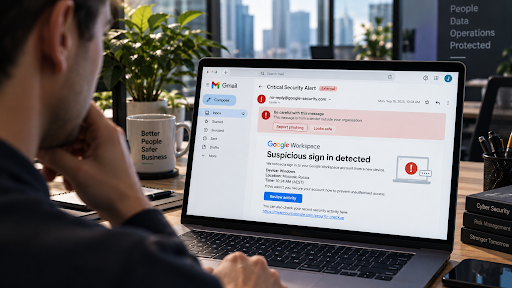
A Google Workspace security alert lands in your inbox, and your stomach drops. Has someone actually tried to break into your business account? Or is this just another phishing email dressed up to look official?
Australian businesses receive thousands of these alerts every week. Some are genuine warnings from Google. Others are scams built to trick you into handing over your password. Getting the call wrong either way can be costly, so knowing the difference matters.
This guide breaks down what a Google Workspace security alert actually is. You’ll also learn how to spot a fake, and what to do next.
What Is a Google Workspace Security Alert?
A Google Workspace security alert is a notification Google sends when it spots unusual activity on an account. This could be a sign-in from a new device, a password change, or an unusual file download. Google’s Alert Centre tracks dozens of different event types, and each one flags a different kind of risk.
For everyday staff, alerts usually arrive by email. Admins can also view them inside the Google Admin console. Either way, the goal is the same: warn you quickly enough to act before real damage happens.
Unfortunately, scammers know these alerts work well. As a result, they copy the format closely, hoping you’ll panic and click before checking anything properly.
Genuine Alert or Phishing Scam? How to Tell the
Difference
Before you click, react, or reset anything, slow down and check the basics. A few quick checks usually reveal whether a Google Workspace security alert is genuine.
Signs the alert is genuine
- It comes from an official google.com sending address, not a lookalike domain
- Links point to accounts.google.com or admin.google.com when you hover over them
- It never asks you to type your password directly into the email
- It matches activity you can also see inside your own account or Admin console
- The writing is clear and professional, without urgent threats or countdowns
Signs it’s a scam
- The sender address looks slightly off, with extra letters, numbers, or a different domain
- The link leads somewhere that clearly isn’t a genuine Google page
- The email pressures you to act within minutes, or threatens account closure
- It asks for your password, a verification code, or payment details directly
- The formatting feels rushed, inconsistent, or oddly worded
If you’re ever unsure, don’t click anything inside the email. Instead, open a new browser tab and log into your account directly. From there, you can safely check your recent activity yourself.
Check “Last Account Activity” in Gmail
Gmail includes a simple, often-overlooked feature for checking your own activity, no alert email required. Scroll to the very bottom of any Gmail inbox and click “Details.” A pop-up appears showing your recent sign-ins, including the location, device type and time of each one.
Look for anything that doesn’t add up. Are there sign-ins from a country you don’t do business in? Multiple IP addresses within a short window is another red flag. So is activity in the middle of the night, when nobody’s working.
That said, treat this check as one signal among several. Experienced attackers often route their traffic through a VPN. That means a login can appear to come from Australia even when it isn’t. Use this check alongside the ones above, not instead of them.
Common Google Workspace Security Alerts You Might Receive
Not every alert means the same thing. Here are the ones Australian businesses see most often, and what each one is really telling you.
- Suspicious login blocked: Google stopped a sign-in attempt that didn’t match your usual location or device.
- Leaked password detected: Your password has appeared in a known data breach elsewhere on the internet.
- New device signed in: Someone accessed your account from a device Google hasn’t seen before.
- Admin privileges granted: A user in your organisation was given elevated access rights.
- Third-party app authorised: An external application was just given permission to access your Google data.
- Unusual download activity: A large number of files were downloaded or forwarded in a short window.
Each of these can be completely harmless. Equally, each one can be an early sign of a Google Workspace account compromise already in progress. Want a deeper look at how these incidents unfold? Our guide on spotting a Google Workspace account compromise walks through every warning sign.
What to Do When You Receive a Security Alert
When a Google Workspace security alert arrives, work through these steps in order.
- Pause before clicking anything. Panic is exactly what a scam email relies on.
- Check the sender address closely. Look for extra characters or an unfamiliar domain.
- Log in directly, rather than through any link in the email itself.
- Review your recent account activity for sign-ins, devices, or locations you don’t recognise.
- Change your password and enable MFA immediately if anything looks even slightly off.
- Report it to your IT team or security provider, even if you’re only partly unsure.
Acting quickly matters here. Most attackers move fast once they’re inside an account, so the sooner you respond, the smaller the potential damage.
Why These Alerts Matter for Australian Businesses
Email and account compromise isn’t a rare event reserved for large corporations. More than 90% of successful cyberattacks start with a single phishing email, according to the US Cybersecurity and Infrastructure Security Agency. That’s why a Google Workspace security alert deserves your full attention the moment it lands.
Locally, the picture looks just as serious. The ACSC received tens of thousands of cybercrime reports last financial year, per its Annual Cyber Threat Report. The average self-reported cost of cybercrime for a small business keeps climbing too.
Business email compromise consistently ranks among the most reported cybercrime categories in Australia. In other words, a Google Workspace security alert landing in your inbox isn’t a minor technical notice. Often, it’s your earliest, clearest warning that something needs attention right now.
How to Stop Missing a Genuine Alert
A Google Workspace security alert only helps if someone actually sees it and understands what it means. Too often, alerts sit unread in a single inbox, or get switched off entirely because they feel like noise.
To fix this, send alert notifications to a shared inbox or small team. Avoid relying on just one person, who might be on leave when it matters most.
Which Alert Centre rules should you turn on?
Google Workspace’s Alert Centre includes dozens of pre-built rules, but most businesses never switch them on. At a minimum, we recommend enabling email notifications for:
- Suspicious login and suspicious programmatic login
- Leaked password
- User’s password changed
- User granted admin privilege
- Device compromised
- User suspended due to suspicious activity
- Phishing message detected post-delivery
- Rate-limited recipient, often a sign of outbound spam from a hijacked account
- Vault accelerated deletion initiated
- Admin password reset
Set every rule to notify your team by email, rather than logging quietly in the background. From there, review what’s triggering regularly, so genuine threats never get lost among routine notifications.
Managing this alongside everything else can feel like a lot. That’s exactly the gap our Google Workspace security services are built to close. We also offer ongoing cyber security monitoring, so alerts get watched and actioned properly, every single day.
How Sentry Cyber Can Help
Sentry Cyber is an Australian cybersecurity consultancy that specialises in Google Workspace security. We help businesses across Australia tell a routine alert from a genuine attack. Then we help you respond properly, fast.
Depending on where your business is at, we can help with:
- A vulnerability assessment to uncover weaknesses before an attacker finds them
- Penetration testing to test your Google Workspace defences under real conditions
- Cyber awareness training so your team recognises phishing before they click
- Incident response support if you suspect an account has already been compromised
- Ongoing security monitoring so alerts never slip through unnoticed
Want to work through the basics yourself first? Grab our free Google Workspace Security Playbook for a practical, no-cost starting point.
Frequently Asked Questions
Is every Google Workspace security alert genuine?
No. While Google does send real alerts for suspicious activity, scammers regularly copy the format to create convincing phishing emails. Always verify the sender address and check your account directly rather than trusting the email alone.
What should I do if I already clicked a link in a fake alert?
Change your password immediately through a trusted, separate browser tab. Then turn on multi-factor authentication if it isn’t already active. Review your recent account activity and connected apps, and contact your IT or security team straight away.
Can I turn off Google Workspace security alerts?
Technically, yes, but this isn’t recommended. Turning off alerts removes one of your earliest warning signs of a genuine account compromise. Instead, route alerts to a shared inbox so they get seen without overwhelming any single person.
How quickly should I respond to a security alert?
As quickly as possible. Attackers who gain access to an account often move fast. Even a few hours’ delay can make a real difference to how much damage occurs.
Who should I contact if I’m not sure whether an alert is real?
Speak with your internal IT team first, or contact a specialist Google Workspace security provider like Sentry Cyber. We can help you verify the alert and check whether anything else in your environment needs attention.
Final Thoughts
A Google Workspace security alert isn’t something to ignore, but it isn’t something to panic over either. Slow down, check the sender, verify through your account directly, and act quickly once you know what you’re dealing with.
Prefer to have specialists watching this for you? Sentry Cyber can review your Google Workspace environment and set up monitoring that actually gets seen. Book a security assessment to get started, or download our free Google Workspace Security Playbook today.