If you’ve booked an apartment, bought a lounge, caught a flight, switched on your gas and electricity, or stayed at a hotel in recent years, your details may be stored in a database that hackers have accessed.
This is not scare-mongering. It reflects what Australian businesses and their customers have faced in 2026. Several well-known companies have confirmed cyber incidents this year. These incidents may have exposed real people’s names, email addresses, phone numbers and, in some cases, passwords.
The aim of this article is not to name and shame these companies. Instead, we want you to ask one simple question:
Have any of these organisations stored my personal details?
If the answer is yes, take a few steps today. These actions can help stop a data breach from becoming a bigger problem, such as someone taking over your email or bank account.
Why one data breach can turn into ten
Here’s what many people miss. A data breach at an energy company or homewares store can expose more than your name and email address. It may also expose your password, or a version of it.
Many people reuse the same email and password across several accounts. These may include online banking, social media, work accounts and shopping websites. As a result, one stolen password can put many accounts at risk.
Hackers use a method called credential stuffing. They take stolen login details from one breach and try them on other websites. This can let them access accounts that the original breach never affected.
Therefore, the biggest risk may not be the breach you already know about. It could be every other account where you reused the same password.
The 2026 Australian data breach list so far
Here are some of the larger Australian data breaches confirmed in 2026. This is not a complete list. Dozens of smaller incidents have also been reported this year. However, these incidents may have affected a large number of Australians.
This comprehensive data breach list provides details about reported incidents. We recommend reviewing it a few times each year.
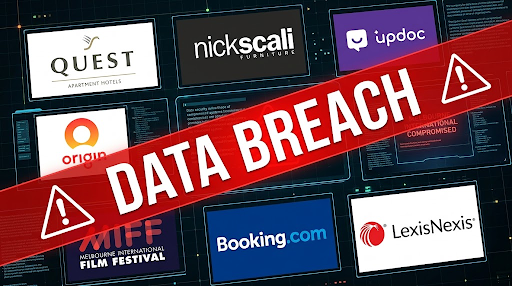
Quest Apartment Hotels – August 2026
Quest confirmed a security incident that affected guest records. The breach included names, email addresses and other contact details from stays before June 2025. If you have stayed at a Quest property for work or leisure, check whether the company has contacted you.
Nick Scali – August 2026
The furniture retailer had to process orders manually after a cyber attack disrupted its systems. Reports linked the attack to an offshore criminal group that demanded a ransom.
Updoc – August 2026
Updoc confirmed a cyber incident that may have exposed customer contact details. These details included names, email addresses and postal addresses.
Origin Energy – July 2026
Origin confirmed that almost one million current and former customers were affected by a data breach. The company then began contacting affected people directly.
Melbourne International Film Festival (MIFF) – June 2026
Hackers claimed they had accessed the details of more than 340,000 MIFF customers. This became one of the largest reported breaches involving an Australian cultural organisation in 2026.
Booking.com – April 2026
A breach linked to a third-party supply chain compromise exposed customer names, email addresses, home addresses and booking details. The incident has also been linked to targeted phishing attempts against affected guests.
LexisNexis – March 2026
A major cloud breach affected LexisNexis, a company that supplies legal and government information across Australia. Many law firms, courts and government agencies rely on its data. Therefore, the incident could create risks beyond the company’s direct customers.
Don’t forget the Australian data breaches from 2025
Data breaches are not just a 2026 problem. If you have not reviewed your accounts recently, it is worth looking back at 2025 too.
Some of the larger incidents included:
- Qantas: Up to six million customers had personal details exposed after a call centre hack. The exposed information included names, email addresses, phone numbers, birth dates and frequent flyer numbers.
- iiNet: More than 200,000 customers were affected after hackers compromised the broadband provider’s order management system.
- Hertz: Hackers stole customer personal information and driver’s licence details after a breach at a Hertz vendor.
How to check if a data breach affected you
You do not have to guess whether a breach exposed your information. There are a couple of ways to check.
1. Check your email address with Have I Been Pwned
Have I Been Pwned is a free and well-known website. You can enter your email address to see which known data breaches included it. This is a useful first step for anyone who wants to check their exposure.
2. Scan your business email domain
If you run a business, checking one email address at a time is not enough. You need to know whether hackers have exposed any staff logins. These checks should cover known breaches and other reported data leaks.
Sentry Cyber offers this service to businesses. We scan your company domain and prepare a free report. The report shows which staff accounts have appeared in known breaches and leaks.
If you would like a report for your business, get in touch with Sentry Cyber and we will organise it.
What to do right now if a breach may have affected you
If you have an account with any organisation listed above, or another company that has suffered a breach, take these steps today.
1. Change exposed and reused passwords
Reset the password on the affected account. Also change it anywhere else you used the same or a similar password. Use a unique, strong password for every account. A password manager can help you create and store them safely.
2. Turn on multi-factor authentication (MFA)
Enable MFA wherever a service offers it. This adds another step to the login process. As a result, a stolen password alone may not be enough for a criminal to access your account.
3. Watch out for phishing emails
Be careful with emails that mention the breach. Criminals often send fake messages after an incident. These messages may ask you to verify your account or reset your password. Instead of clicking their links, visit the company’s official website directly.
4. Secure your email account first
Your email account deserves strong protection. If a criminal gains access to it, they may be able to reset passwords for many of your other accounts. Therefore, use a unique password and strong MFA for your main email account.
Not all MFA methods offer the same protection
Enabling MFA is a good step. However, the type of MFA you choose also matters. Some methods offer stronger protection than others.
SMS and phone call verification
SMS and phone call codes offer less protection than stronger MFA options. Criminals may bypass them through SIM swapping. In this type of attack, a criminal tricks your mobile provider into moving your phone number to another SIM card.
Attackers can also use phishing pages to capture verification codes as you enter them. SMS verification is still better than using a password alone. However, it should not be your only defence for important accounts.
Authenticator apps and hardware security keys
Authenticator apps and physical security keys offer stronger protection. Apps such as Google Authenticator and Microsoft Authenticator generate codes for login checks. Physical security keys provide another way to verify your identity.
These methods are harder to intercept than SMS codes. Therefore, choose an authenticator app or hardware security key whenever a service offers one.
How to enforce MFA in Google Workspace
If your business uses Google Workspace, do not leave MFA as an optional setting. Many staff members may not enable it until an incident occurs.
As an administrator, you can enforce MFA across your organisation through the Google Admin console. This requires staff to use a second factor when they sign in.
By enforcing MFA, you reduce the risk of attackers using stolen or reused passwords to access staff accounts. It is one of the most useful steps you can take to protect your organisation.
Google Advanced Protection Program for high-risk accounts
Standard MFA may not offer enough protection for your highest-risk accounts. These accounts may belong to administrators, finance staff and senior managers.
Google’s Advanced Protection Program provides extra security for people who face a higher risk of targeted attacks. It requires physical security keys for sign-in and limits access from many third-party apps. It also adds extra checks for malicious downloads and phishing.
If you manage Google Workspace or hold an executive role, consider enrolling your account in this program.
Don’t wait until your business appears on a data breach list
None of the businesses on the 2026 list expected to make the news. Many organisations learn about a breach through a hacker’s claim or a customer complaint. Their own security tools may not detect the incident first.
At Sentry Cyber, we help Australian businesses find and fix security gaps before attackers exploit them. Our services include:
- Penetration Testing – We test your systems using methods that real attackers may use. This helps you find weaknesses before criminals do.
- Vulnerability Assessments – We scan your systems and network to identify known security weaknesses before attackers can exploit them.
- Security Monitoring – We monitor for suspicious activity and help your business respond to threats sooner.
Get your free data breach exposure report
Want to know whether hackers have exposed your staff login details in a data breach?
Contact Sentry Cyber and we will run a free report across your company domain. We will also explain what the results mean and what steps you should take next.