
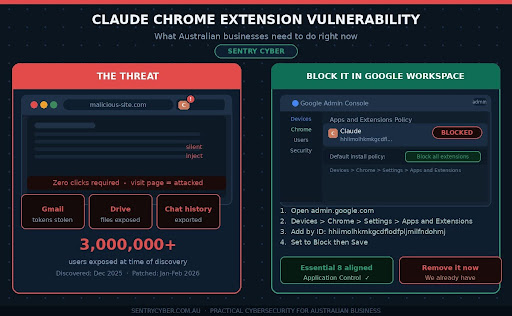
If your team uses the Claude Chrome extension, this post is important. A significant vulnerability was recently discovered that could have allowed attackers to silently take control of the extension without your staff doing anything at all. No clicks. No warnings. No visible signs.
The flaw has since been patched, but the incident raises real questions about how businesses manage AI tools and browser extensions. At Sentry Cyber, we use Claude as part of our own work. We were using this extension ourselves until we learned about this vulnerability. Until we are fully confident it is safe, we have removed it from all team devices and we are not allowing anyone on our team to reinstall it.
We recommend you do the same.
What Happened With the Claude Chrome Extension
Security researchers at KOI Security discovered what is known as a zero-click vulnerability in the official Claude Chrome extension by Anthropic. At the time of discovery, the extension had over three million users.
The term zero-click means a victim does not need to do anything to be compromised. Simply visiting a malicious website was enough to trigger the attack.
Here is a plain-English breakdown of how it worked.
The Claude extension has a feature that accepts instructions and forwards them to the AI to carry out. The extension was designed to only accept instructions from Claude’s own website. However, the rule it used to check this was too broad. It accepted messages from any subdomain ending in *.claude.ai, which turned out to include a third-party component used for CAPTCHA verification.
Attackers could inject malicious code into that third-party component and use it to send instructions directly to the Claude extension. Because it looked like a trusted source, the extension carried out those instructions without question.
Once the attack was in motion, an attacker could potentially:
- Steal your Google account access tokens
- Read your Gmail and Google Drive files
- Export your Claude conversation history
- Send emails from your account
All of this could happen silently in the background while someone was simply browsing the web.
The Good News: It Has Been Patched
To their credit, Anthropic responded quickly after the vulnerability was disclosed. A fix was deployed in January 2026, followed by a second patch in February 2026 to address a related issue in the third-party component. The extension was updated with a stricter origin check that no longer allows that broad wildcard.
If you have the Claude Chrome extension installed, you should check that your version is 1.0.41 or higher. You can do this by going to chrome://extensions in your browser and looking at the version number next to the Claude extension.
However, even though a patch is available, our position at Sentry Cyber is clear. We will not be reinstating this extension until we have had time to properly assess the updated version. A patched vulnerability does not automatically restore trust. It takes time to verify, and until then, the safest approach is to keep it off your business devices.
Why This Is Part of a Bigger Pattern
This is not an isolated incident. We have written previously about Malicious Chrome Extensions: What Australian Businesses Need to Know Right Now and the risks that come with browser extensions being installed without oversight.
We have also covered how AI tools introduce new risks through their supply chains in The Hidden Threat in Your Software: What Business Owners Need to Know About AI Security and Supply Chain Attacks.
This Claude extension vulnerability is a perfect example of both issues colliding. It involved an AI tool, a browser extension, and a supply chain weakness through a third-party vendor. The attack surface was larger than most businesses would ever think to check.
As AI assistants become more capable and more deeply integrated into browsers, they also become higher-value targets. The more access a tool has, the more damage can be done if something goes wrong.
How This Connects to the Essential 8
The Australian Cyber Security Centre’s Essential 8 framework includes application control as one of its core strategies. The principle is straightforward: only allow approved software and applications to run in your environment.
Browser extensions fall squarely within this principle. They are software. They run with significant permissions. And yet most businesses have no formal process for approving, reviewing, or blocking them.
If your organisation is working toward Essential 8 compliance, managing Chrome extensions through your Google Workspace admin console is a practical and concrete step you can take right now.
A security assessment can help you understand where you currently sit against the Essential 8 and what needs to be done to close the gaps.
How to Block the Claude Chrome Extension in Google Workspace
If your business uses Google Workspace, you can manage which Chrome extensions your staff are allowed to install. This is done through the Google Admin console and it does not require technical expertise to set up.
Here is a step-by-step guide.
Step 1: Open the Google Admin Console
Go to admin.google.com and sign in with your administrator account.
Step 2: Go to Chrome Management
In the left-hand menu, click on Devices, then Chrome, then Settings. Select Users and Browsers.
Step 3: Select the Right Organisational Unit
If you want this to apply to your whole organisation, make sure you have the top-level organisational unit selected. If you only want it to apply to certain teams, select the relevant sub-unit.
Step 4: Find the Extensions Policy Settings
Scroll down or search for the section called Apps and Extensions. Click on it. This will take you to the Chrome Apps and Extensions management page.
Step 5: Block the Claude Extension
Click the yellow plus button in the bottom right corner and select Add Chrome app or extension by ID. The extension ID for the Claude Chrome extension is hhiimolhkmkgcdflodfpljmilfndohmj. Enter this ID and click Save. Set the permission to Block.
Step 6: Prevent Users From Installing Extensions You Have Not Approved
To go a step further, you can set the default installation policy to Block all apps and extensions, then only allowlist the ones you have reviewed and approved. This aligns directly with the Essential 8 application control strategy and gives you full visibility and control over what runs in your staff’s browsers.
Step 7: Communicate the Change to Your Team
Let your staff know what you have done and why. A short email explaining that you have blocked a specific extension due to a security vulnerability will go a long way. It builds awareness and helps people understand that these decisions are made to protect them, not to restrict them unnecessarily.
If you want to build that kind of culture across your team, cyber awareness training is one of the most effective things you can do.
What If You Do Not Use Google Workspace?
If your business uses Microsoft 365 and manages devices through Intune or Entra ID, you can achieve similar results through browser policy controls. The principle is the same: define what is allowed and block what is not.
If you are unsure where to start, Sentry Cyber’s security consulting team can review your current setup and help you put practical controls in place that match your environment and risk level.
Our Recommendation
If the Claude Chrome extension is installed on any of your business devices, remove it now. Check that it is fully removed and not just disabled.
If you want to use Claude for work, the web version at claude.ai works well without needing the extension at all.
Once Anthropic has had more time to demonstrate the stability of the patched version, and once we have had the opportunity to review it properly, we will revisit our position. But right now, the risk is not worth it.
If you are not sure whether the extension is installed across your team’s devices, or if you want help locking down Chrome across your organisation, get in touch with Sentry Cyber. We can help you get visibility and control over what is running in your environment.
Conclusion
The Claude Chrome extension vulnerability is a good reminder that the tools we trust most can sometimes carry hidden risks. The vulnerability has been patched, but the lesson is bigger than this one incident.
Your business needs a clear, consistent approach to managing browser extensions and AI tools. That means approving only what has been reviewed, blocking what has not, and making sure your team understands why those boundaries exist.
If you want help building that kind of approach, Sentry Cyber is here. We offer Google Workspace security services, security assessments, and CISO as a Service for businesses that want expert guidance without hiring a full-time security team.
Get in touch today and let us help you take control of your cyber risk.
- FAQ
Q: Is the Claude Chrome extension safe to use now?
A: Anthropic has released a patch and the vulnerability has been fixed in version 1.0.41 and above. However, at Sentry Cyber we have taken the position of removing the extension until we have had time to properly assess the updated version. We recommend most businesses do the same, especially if they handle sensitive data.
Q: How do I know if the Claude Chrome extension is installed on my team’s devices?
A: If you use Google Workspace, you can check this through the Chrome management section of your Google Admin console. It will show you which extensions are installed across your managed devices. If you are not sure how to do this, Sentry Cyber can help.
Q: What is a zero-click vulnerability?
A: A zero-click vulnerability is a flaw that can be exploited without the victim doing anything. In this case, simply visiting a malicious website while the Claude extension was installed was enough to trigger the attack. The user would not see any warning or prompt.
Q: What is a prompt injection attack?
A: A prompt injection attack is when an attacker tricks an AI tool into following their instructions instead of the legitimate user’s instructions. In this case, attackers could inject malicious instructions into the Claude extension through a trusted-looking source, causing it to carry out actions on their behalf.
Q: How does the Essential 8 relate to Chrome extensions?
A: The Essential 8 framework from the Australian Cyber Security Centre includes application control as a core strategy. This means only allowing approved software to run in your environment. Browser extensions are software and should be managed as such. Blocking unapproved extensions through Google Workspace is a practical way to apply this principle.
Q: Can I still use Claude without the Chrome extension?
A: Yes. The Claude web app at claude.ai provides full access to Claude’s features without needing to install any extension. For most business use cases, the web version is all you need.
Q: What should I do if I am not sure whether my business is exposed?
A: The best starting point is a security assessment. Sentry Cyber can review your current environment, identify risks, and give you practical recommendations. Get in touch here.