
Google Workspace Cyberattack Risk Assessment
What’s your Cyber Risk Score?
Your security settings could be leaving your business exposed without you knowing. We check 67 critical controls, informed by 200+ real cyber incidents, to give you a Cyber Risk Score and a clear plan to reduce your risk of a costly breach.
Led by Adrian Cosman-Jones and Anurag Adhikari: 15+ years securing Google Workspace, 200+ incident responses.
THE RISKS ARE REAL
Where cyberattacks start
Attackers can spend weeks or months inside your environment undetected, planning their next move.

Email and phishing
Most successful breaches start with a phishing email. We check how well yours are blocked.

Staff and admin accounts
Attackers target staff with access to valuable data. We check how your users could be compromised.

Devices and browsers
We check your computers, browsers and internet-facing systems are secure.
- We check your computers, browsers and internet-facing systems are secure.
Visualise your exposure
One clear score.
A better understanding
of your risk.
Your assessment shows where security weaknesses sit
and which ones demand attention first.
The sample result demonstrates how a business could fall into
a high-risk category.
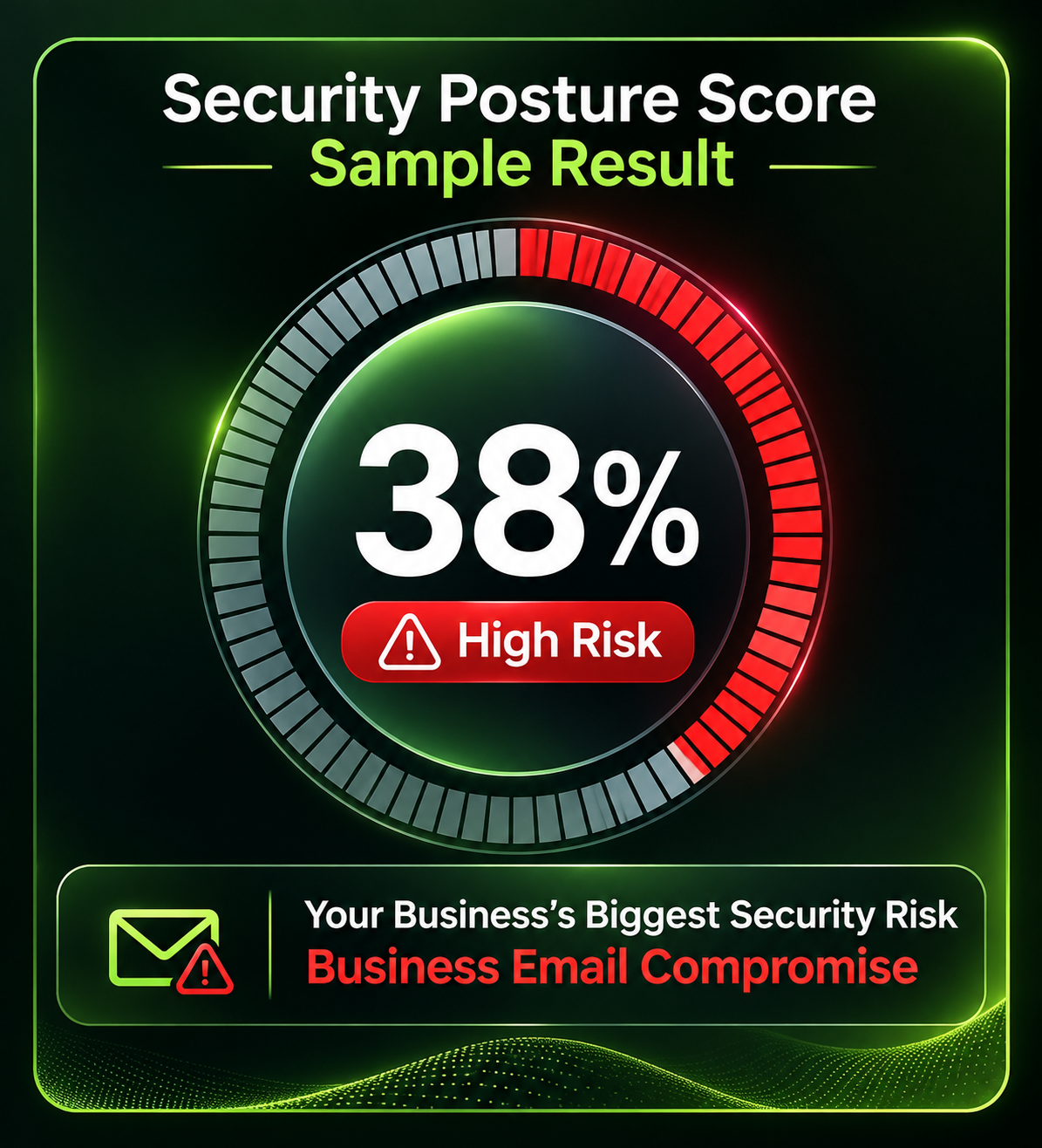
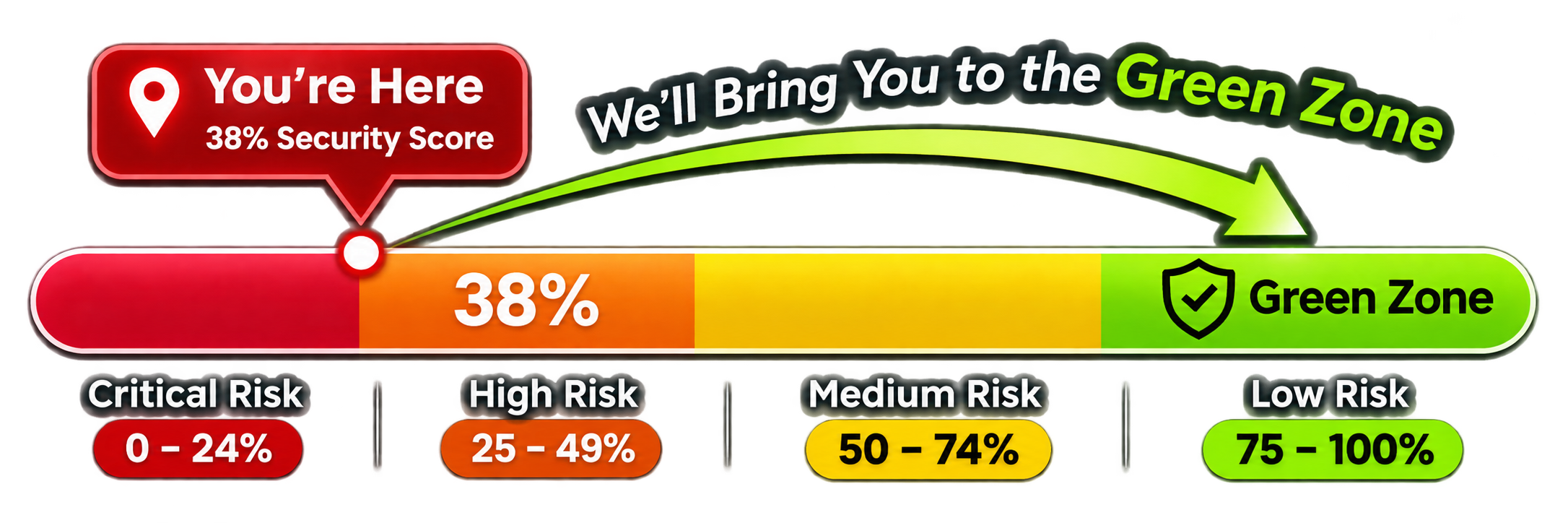
Our security risk assessment shows how exposed your business
is and what needs fixing. We identify critical weaknesses and provide a
clear roadmap to reduce risk, strengthen your defenses, and move
your business into the green zone.
What we examine
Five layers of protection
Our 67 selected checks are organised around the practical safeguards that protect
your people, accounts, and information.

Checks

Checks
Checks
Checks

Checks
Stop phishing and email impersonation
Sender verification, spoofing protection, risky links, attachments and forwarding.
Stop phishing and email impersonation
Sender verification, spoofing protection, risky links, attachments and forwarding.
Stop phishing and email impersonation
Sender verification, spoofing protection, risky links, attachments and forwarding.
Stop phishing and email impersonation
Sender verification, spoofing protection, risky links, attachments and forwarding.
Stop phishing and email impersonation
Sender verification, spoofing protection, risky links, attachments and forwarding.
What the risk
assessment includes
We review Google Workspace settings and discuss the supporting business controls that may affect your security. You receive a clear record of what is in place, what needs attention and what does not apply, along with priority actions to address important gaps.
-
 Email and phishing protection

Phishing remains one of the most common ways cybercriminals target businesses. We review 19 critical controls to stop all forms of malicious emails, prevent impersonation and limit how much sensitive information can be stolen if a staff account or device is compromised.
SPF sender authorisation
SPF identifies the services allowed to send email using your business domain. We check that your record covers genuine senders without unnecessarily authorising others.
DKIM email signing
DKIM adds a digital signature to outgoing email. It helps receiving systems confirm a message was authorised by your domain and has not been altered in transit.
DMARC enforcement
DMARC tells receiving systems what to do when messages fail aligned email authentication checks. A properly enforced policy makes direct domain impersonation harder.
Lookalike domain protection
Criminals can register addresses that look almost identical to your business domain. We review protections that help staff spot these convincing imitation emails.
Staff name impersonation protection
A fake message appearing to come from your director or finance manager can lead to fraudulent payments. We check whether Gmail flags this type of impersonation.
Protection against spoofing your own domain
An attacker may send an incoming message pretending to come from your business. We check how Gmail handles suspicious messages claiming to use your own domain.
Checks for unauthenticated incoming email
Messages that fail sender authentication deserve extra scrutiny. We review how Gmail identifies and handles them before someone in your business trusts the sender.
Google Groups spoofing protection
Google Groups can receive messages that look like they come from trusted colleagues. We check controls that help stop attackers using Groups to impersonate your organisation.
Encrypted attachment protection
Password protected attachments can conceal harmful files from ordinary scanning. We review how Gmail handles encrypted attachments arriving from unknown or untrusted senders.
Risky script and attachment protection
Malicious scripts and unusual file types can infect a computer when opened. We check whether extra Gmail attachment protections are enabled.
Shortened link and linked image scanning
A short web link can hide a dangerous destination, while email images can point to harmful sites. We check the additional scanning protections available in Gmail.
Warnings before opening suspicious links
A warning before a risky website opens gives staff a chance to avoid a phishing trap. We check whether Gmail displays the relevant warnings where supported.
Enhanced email scanning and sandboxing
Some threats only become obvious after deeper analysis. We check whether enhanced scanning or security sandbox features are available and appropriately configured.
Additional email filtering review
Built in Gmail filtering may not cover every business risk. We assess whether your circumstances warrant additional email security, rather than recommending extra software automatically.
Spam and security bypass exceptions
Trusted sender lists and bypass rules can accidentally allow dangerous messages straight through. We review exceptions to make sure they are justified and limited.
Automatic external email forwarding
Someone who takes over a mailbox may secretly forward new emails to an outside address. We check whether unauthorised forwarding is restricted.
Disable unnecessary POP access
IMAP can synchronise years of business emails onto computers and mobile devices. Restricting it to approved applications and devices helps limit the amount of confidential information exposed if one device is compromised.
Restrict IMAP connections
Google Groups can receive messages that look like they come from trusted colleagues. We check controls that help stop attackers using Groups to impersonate your organisation.
Outlook sync connections
Email clients can behave differently from Gmail, including when security warnings are displayed. We check whether Outlook sync is needed and what protections may be affected.
Sensitive Google Groups access
A Google Group can reveal conversations, documents or internal addresses to the wrong audience. We review who can view its content and post messages.
-
Accounts and access
Make stolen passwords less useful and keep powerful accounts under control.
A stolen password should not be enough to open a business account. We check that MFA is enforced for existing users, new starters, and other relevant accounts.
Separate administrator accounts
Using an administrator account for ordinary email and browsing creates unnecessary exposure. We check that powerful admin access is kept separate from everyday work.
Minimum necessary administrator permissions
If cybercriminals compromise an administrator account, they could gain access to far more than one person’s information. Limiting privileges reduces the number of systems, accounts, and security settings they can control.
Super administrators can change almost every security setting in Google Workspace. We check whether the number of these powerful accounts is kept to a practical minimum.
Temporary administrator privileges
Extra access should not remain in place after a task is finished. Where the available tools allow it, we review how temporary privileges are granted and removed.
-
Security alerts and suspicious activity
Would you know if someone was inside? Make sure the right people see warning signs and can investigate quickly.
An alert offers little protection if nobody reads it. We check that important warnings reach a monitored inbox, helpdesk or responsible person.
Suspicious sign in alerts
An unfamiliar location, device or automated login attempt can indicate stolen credentials. We review whether relevant alerts are enabled and investigated.
Leaked password alerts
Passwords exposed in other data breaches may be used to attack work accounts. We check whether Google warnings about compromised passwords are acted on.

Attackers may change recovery details or sign in methods to maintain access. We review how unusual account security changes can be detected.
New administrator privilege alerts
An attacker with administrator privileges could weaken security across the business. We check whether new grants of admin access trigger an appropriate warning.
A compromised phone or computer may put business accounts at risk. We review whether available device warnings reach someone who can respond.
Suspicious account suspension alerts
Google may suspend an account when it detects unusual activity. We check whether these events are promptly reviewed rather than being treated as routine support issues.
Phishing found after email delivery
Some harmful messages are identified only after reaching an inbox. We review whether those later warnings are seen and acted on.
Unusual outgoing email activity
An attacker may use a real staff mailbox to send scams to clients and suppliers. We look at how unusual sending patterns are detected and investigated.
Unexpected Google Vault deletion activity
Unusual changes to retained information can affect your ability to investigate incidents or meet obligations. We review available Vault alerts where relevant.
Administrator password reset alerts
Some harmful messages are identified only after reaching an inbox. We review whether those later warnings are seen and acted on.
Unusual forwarding, app and sharing changes
Attackers often create forwarding rules, approve apps or change file access to maintain access or extract information. We review how these changes are monitored.
Large downloads, exports and sharing events
Someone downloading or exporting unusually large amounts of data could be stealing client records. We check what monitoring is available and whether suspicious activity can be investigated.
-
IF you get breached, how might you protect the crown jewels?
Reduce accidental exposure of client records, financial data and confidential files.
Shared drives help keep company information under business control rather than tied to one employee. We review how drives are organised and who manages access.
External sharing from My Drive
Staff can unintentionally share business files outside the company from personal My Drive areas. We check whether external sharing is limited to legitimate business needs.
Public file sharing restrictions
A file shared with anyone on the internet can expose sensitive information without anyone realising. We review policies that govern public links and open access.
Sensitive information labels
If staff do not know which files are confidential, they can easily share them incorrectly. We check whether important
information is identified and labelled appropriately.
Data loss prevention can warn about or block risky sharing of sensitive information. We review whether suitable controls are available in your Google Workspace edition.
Controlled syncing and offline files
Google Drive can store local copies of business files, including sensitive client information. Restricting unnecessary synchronization and offline access reduces the information available to cybercriminals who compromise a computer.
Google Takeout and large exports
Google Takeout and other export methods can make it easy to copy substantial amounts of business data. We review restrictions and visibility where appropriate.
Outside applications reading Gmail and Drive
Connected apps may have broader access to your business data than expected. We check whether those permissions are still necessary and appropriately limited.
-
Devices, browsers and approved applications

Reduce the risk from unsafe browser tools and connected apps.

Some browser extensions can read website content, email, or session information. We review whether staff can install unapproved extensions and what permissions they request.
Marketplace apps can ask for powerful access to Google data. We check whether staff can connect only approved business applications.
-
Additional security and business process checks
These items are discussed with your team because safe settings also depend on how people and systems are managed.
A convincing caller should not be able to take over a staff account by asking for a password or MFA reset. We review how your team verifies identity first.
Business owners and other high risk users can be attractive targets for account takeover. We discuss whether Google’s Advanced Protection is suitable for them.
Reused passwords increase the impact of breaches elsewhere. We review whether staff have a practical, approved way to create and store unique passwords.
Security keys or passkeys for administrators
Administrator accounts need stronger protection against phishing. We review whether admins use phishing-resistant sign-in methods such as security keys or suitable passkeys.
Security keys or passkeys for finance and senior staff.
People who approve payments or handle sensitive information are valuable targets. We review whether stronger sign-in protections are appropriate for these roles.
Security log retention and review
Without useful logs, a business may struggle to find out who accessed an account or what they did. We discuss log availability, retention, and monitoring arrangements.
Weaknesses in firewalls, VPNs, and exposed services
An insecure remote access service can provide another way into business systems. We ask whether internet-facing systems are regularly checked and serious issues fixed.
Old software can contain known weaknesses attackers exploit. We check whether your business has a reliable process for updating operating systems, browsers, and essential apps.
Managed antivirus or endpoint protection
A compromised computer can expose Google sessions even when account settings are strong. We ask whether business devices have centrally monitored protection.
Restricted local computer administrator access
Staff generally do not need full administrator access to complete everyday tasks. Restricting this access can limit what malicious software can change on a device.
Independent Gmail and Drive backups
Accidental deletion, account compromise, or a major incident can leave important data unavailable. We ask whether business email and files are backed up independently.
Tested restoration of email and files
A backup is only useful if you can restore information when needed. We check whether your business has tested recovery of Gmail and shared files.
When an account is hacked, delays can increase damage. We ask whether your team knows how to contain access, investigate activity, and contact affected people.
Security awareness and phishing exercises
Even good filtering will not stop every suspicious message. We review whether staff receive practical training and learn to recognise common scams.
Written cyber security policy
Staff need clear rules for accounts, devices, information sharing, and reporting suspicious activity. We ask whether those expectations are documented and understood.
Verification of invoice and bank detail changes
Criminals often use compromised email threads to request fraudulent payment changes. We check whether changes are confirmed through a separate trusted contact method.
Business continuity arrangements
If Gmail or Drive becomes unavailable, your business still needs to operate. We ask whether you have a practical plan for essential communications and files.
From findings to action
Know your score. Lower your risk.
A practical process designed to turn technical findings into decisions your business can act on.
-
LEARN

Understand Your Exposure
Cyber risks don’t affect every business equally. We understand your operations to identify and prioritise the risks that matter most to you.
-
PRIORITISE
We review your settings
You grant us read-only access to your Google Workspace environment. We assess 67 priority security controls and ask targeted questions to identify potential risks.
-
IMPROVE
You get an action plan
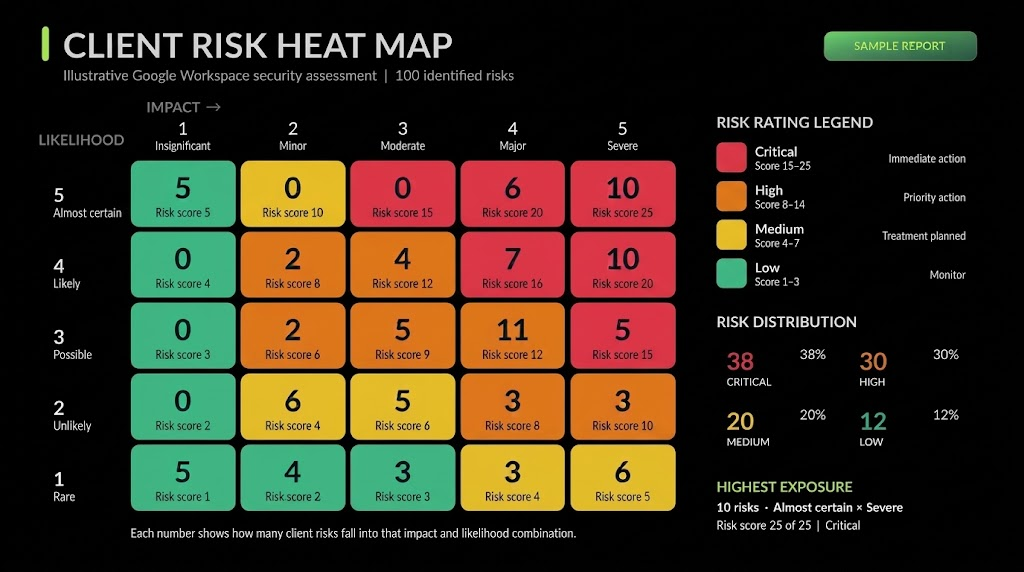
Receive a detailed security report with your Cyber Risk Score, risk heat map and prioritised remediation roadmap, giving your IT team or MSP clear actions to reduce vulnerabilities and move your business towards a stronger, more secure position.
What you receive
Your security, clearly explained.
A detailed, practical report that puts the findings in perspective and gives your IT team or MSP a clear way forward.
Google Workspace
Security Audit Report

Illustrative Client Report
Assessment
What we review
- Identity and Access
- Email Protection
- Data protection
- Threat Detection
- Device Security
- Security audit findings and Cyber Risk Score
- Visual risk heat map to highlight exposure
- Prioritised remediation roadmap
- Clear actions to help improve your risk rating
Settings depend on your Workspace edition.
Some checks are confirmed on a guided call rather than through admin access.
Client Risk Heatmap
Illustrative Client Report
Assessment
What we review
-
Secure Privileged Access
Immediate -
Review External Sharing
(Priority) -
Configure Security Alers
(Priority) -
Improve Device Controls
(Planned)
Questions Business Owners
Commonly Ask About
Google Workspace Security
How do I stop cybercriminals from hacking my Google Workspace?
Start by protecting staff accounts, blocking phishing emails, and restricting administrator
access and monitoring suspicious activity. Just as importantly, limit how much
confidential information cybercriminals could access if they manage to get in.
Read our Google Workspace phishing prevention guide.
Doesn’t Gmail already protect my business from phishing emails?
Gmail has strong security features, but they don’t guarantee every malicious email will
be blocked. Incorrect settings, security exceptions, and convincing impersonation
attacks can still put your business at risk. That’s why reviewing your Gmail security
configuration matters.
Learn how to strengthen Google Workspace against phishing.
Can cybercriminals send emails pretending to be from my business?
Yes. Cybercriminals can impersonate your business using fake sender details or
lookalike domains, potentially tricking clients into paying fraudulent invoices. SPF,
DKIM and DMARC help protect your domain, while additional controls
Detect impersonation attempts.
Read our Google Workspace phishing protection guide.
Do I need to update Google Workspace, Chrome, and Outlook regularly?
Google maintains its cloud services, but the computers, browsers, email applications
and extensions your staff use still need security updates. Cybercriminals can exploit
known software weaknesses, sometimes shortly after they become public.
Learn why delaying security updates can expose your business.
What are some less obvious ways cybercriminals can access Google Workspace?
One overlooked risk is Chrome extensions. Some can access information displayed in
Gmail, Google Drive, and other business applications. Connected apps, unnecessary
email synchronisation and excessive permissions can also expose confidential
information without an obvious account takeover.
Discover the hidden security risks of Chrome extensions.
Yes. Multi factor authentication significantly improves security, but cybercriminals
may still exploit stolen browser sessions, malicious connected applications or
convincing phishing attacks. Security keys, passkeys and monitoring provide additional layers of protection.
Read our guide to protecting Google accounts.
Is it safe for staff to access Gmail through Outlook, POP or IMAP?
These connections can create local copies of business emails and attachments. If an
employee’s computer is compromised, cybercriminals may gain access to years of
confidential conversations. We check whether these connections are necessary
and appropriately restricted.
Learn more about protecting Google Workspace business information.
How do I know if someone has logged into my Gmail or Google Workspace account?
Unfamiliar sign ins, unexpected password changes, new email forwarding rules, and
unusual file activity can all indicate an account compromise. Checking Gmail’s recent
Account activity and your Google Workspace security logs can help identify suspicious
access, although not every intrusion is immediately obvious.
Read how to recognise a compromised Google Workspace account.
Important alerts include suspicious sign ins, leaked passwords, administrator permission
changes, compromised devices and unusual email or data activity. Equally important
is ensuring these warnings reach someone responsible for investigating
them, rather than sitting unread in an inbox.
See which Google Workspace security alerts matter most.
How do I know whether a Google security alert is genuine or a phishing scam?
Cybercriminals frequently impersonate Google’s security notifications to steal passwords.
Rather than clicking links in an unexpected alert, visit your Google Account
or Admin console directly and check whether the reported activity is genuine.
Learn how to identify genuine Google Workspace security alerts.
Could a compromised employee laptop expose our Google Drive files?
Yes. Files stored locally through Google Drive synchronisation or offline access could
be stolen from an infected device. Cybercriminals may also use an active account
session to access additional cloud files. Restricting unnecessary copies helps reduce
the damage a compromised computer can cause.
Read our guide to protecting business data in Google Workspace
How can I prevent a compromised administrator account from affecting our
wholebusiness?
Administrator accounts can control users, security settings and access to business
information. Using separate administrator accounts, limiting privileges and granting
elevated access only when needed reduces the potential damage if one account is
compromised.
Read about Cloud Identity and temporary administrator access.
What should I do if our Google Workspace account has already been hacked?
Act quickly to contain the affected account, revoke suspicious sessions and application
access, and investigate what information may have been exposed. Changing a
password alone may not be enough if cybercriminals have created forwarding rules,
stolen data or established other ways to regain access.
Read our Google Workspace incident response guide.
Can a compliance platform like Vanta tell me whether Google Workspace is secure?
Platforms such as Vanta can automate compliance checks and collect evidence, but
they don’t necessarily identify every security weakness cybercriminals could exploit. A
specialist review considers how the controls work together, the risks to your business
and the potential consequences of an incident.
Read our comparison of compliance software and cybersecurity consultants.
How can I find out how
vulnerable my
Google Workspace is
to cyberattacks?
Sentry Cyber’s 67 control assessment reviews carefully selected protections based on the weaknesses we encounter during real cyber incidents. You’ll receive a risk score, a security heat map and prioritised recommendations showing where your business may be exposed and what needs attention.
Unlike a comprehensive Google Workspace audit, this assessment concentrates on preventing common attacks, detecting intruders and limiting the damage if a breach occurs.