
Hit by a cyber attack?
Every minute counts.
Book a complimentary meeting with our Incident response team right now.
In a cyber incident, time is the one thing you can’t get back.
Every hour you wait is another hour the attacker has to drain your accounts, copy your data, and lock you out of your own systems.
Complimentary 30-minute consultation. No obligation. Based in Melbourne. Available across Australia.
-
 Or call us right now on 1800 526 269

First Aid for a Cyber Incident
If you think you’re being hacked right now,
read this first
What you do in the next ten minutes matters more than anything else.
The wrong move can destroy the evidence we need to recover your data, identify the attacker, and stop them from coming back.
-
Do these things

Disconnect the affected device from the internet. Unplug the ethernet cable or turn off WiFi. This cuts the attacker’s remote access immediately.
Leave the device powered on. If you shut it down, you lose volatile evidence (memory, running processes, network connections) that we need to identify the attacker.
Call us straight away on 1800 526 269 or book a meeting at the top of this
page.
Use a different, clean device (a phone with mobile data, or a different laptop) for everything else from this point on.
Call your bank’s fraud line to freeze accounts and report disputed transactions. The faster you call, the better the chance of recovery.
Change passwords & reset sign-in cookies, starting with email, banking, and your password manager.
Take photos or screenshots of any ransom notes, weird pop-ups, unfamiliar logins, or unusual emails. Don’t delete them.
Write down a rough timeline of what you saw and when. Memory fades quickly under stress.
-
Do these things

Don’t reset, wipe, or reimage the device. You destroy the forensic evidence we need to support your bank dispute and insurance claim.
Don’t run a virus scan or “clean up” the machine. Antivirus often misses the sophisticated tools attackers actually use (AnyDesk, ScreenConnect, info-stealers) and the scan overwrites artefacts.
Don’t keep using the compromised device for anything. Not banking, not email, not shopping. Assume everything typed on it is being captured.
Don’t reply to the attacker, click any link they send, or pay any ransom without speaking to us first.
Don’t delete the suspicious emails, browser history, or files. We need them as evidence.
Don’t post about it on social media before you’ve spoken to us. The attacker may be watching and it can affect insurance and legal options later.
Don’t assume changing one password is enough. If your password manager has been touched, every credential in it is exposed.
OUR PROCESS
How we investigate a breach
We follow the NIST Incident Response Lifecycle, the same framework used by global cyber teams and
Australian Government agencies. We’ve adapted it for Google Workspace, Microsoft 365 and Windows
environments based on the kinds of breaches we see most often.

Detection & analysis
For Google Workspace we pull logs from the Admin Console Investigation Tool, checking Gmail, Drive, Contacts, Vault, Takeout and OAuth events. For Windows we take a forensic image and analyse event logs, prefetch and browser history.

Detection & analysis
For Google Workspace we pull logs from the Admin Console Investigation Tool, checking Gmail, Drive, Contacts, Vault, Takeout and OAuth events. For Windows we take a forensic image and analyse event logs, prefetch and browser history.

Containment & recovery
This is where we kick the attacker out. Reset passwords from a clean device, force sign-out of every session, revoke OAuth tokens, remove malicious forwarding rules, re-enrol MFA, and lock the account to a secure baseline.

prevention
Lessons-learned session, then a 30-60-90 day plan to stop it happening again. Usually phishing-resistant MFA, EDR to replace traditional antivirus, network segmentation and ongoing monitoring.

Preparation & triage
On the first call, our CISO works out the scope of the incident. What’s been touched, what hasn’t, and what needs to be isolated right now. You leave the call with a same-day action list.

Detection & analysis
For Google Workspace we pull logs from the Admin Console Investigation Tool, checking Gmail, Drive, Contacts, Vault, Takeout and OAuth events. For Windows we take a forensic image and analyse event logs, prefetch and browser history.

Containment & recovery
This is where we kick the attacker out. Reset passwords from a clean device, force sign-out of every session, revoke OAuth tokens, remove malicious forwarding rules, re-enrol MFA, and lock the account to a secure baseline.

Post-incident & prevention
Lessons-learned session, then a 30-60-90 day plan to stop it happening again. Usually phishing-resistant MFA, EDR to replace traditional antivirus, network segmentation and ongoing monitoring.
WHO WE HELP
Businesses and individuals across Australia
For Business
Most of our incident response work is for small and medium businesses across Australia. We’ve handled everything from a single compromised inbox at a 5-person consultancy through to coordinated attacks against 200-seat professional services firms. We work alongside your existing IT team or MSP and act as the specialist security escalation point.

Common incidents we handle
-
Business Email Compromise (BEC). Attacker watches your inbox quietly, then steps in to redirect a real invoice payment.
-
Notifiable Data Breach assessment. Working out your obligations under the Privacy Act.
-
Google Workspace and Microsoft 365 account takeover. Hidden forwarding rules, delegated mailbox access, mass file downloads.
-
Ransomware. Encrypted servers, locked workstations, ransom demands.
-
Insider data theft. Departing employees taking client lists, source code, or sensitive files.
-
Phishing-led credential theft. Staff click a lure, attacker harvests credentials, account takeover follows.
-
Remote access tool abuse. AnyDesk, ScreenConnect, TeamViewer used by attackers for live hands-on-keyboard fraud.
-
PayID, OSKO and bank transfer fraud. Unauthorised transfers from corporate accounts.


If you’re an individual who’s been the victim of sophisticated cyber harassment or repeated hacking, the kind where the normal IT shops have tried to help, you’ve reinstalled Windows three times, you’ve changed every password, and the attacker keeps coming back, we can help.
We’ve worked with people who’d genuinely started to feel like they were going mad. Phones, laptops, accounts, all of it compromised again and again by someone who knew what they were doing.
Standard IT skills are not enough for this. You need someone who can think like the attacker, look in the places they actually hide, and shut down every pathway back in at the same time.
We’ve done it. We found the problem. We implemented a fix. And we made sure they couldn’t come back.

Common incidents we handle
-
Ongoing harassment and stalkerware where devices keep being compromised after every reset
-
Personal banking fraud and PayID scams
-
Google or Apple ID account takeover


-
Identity theft and document fraud
-
Romance, investment and tech-support scams where the offender installed remote access
-
Forensic support for AFCA bank disputes, insurance claims, ReportCyber and police statements


Why Sentry Cyber
Why clients trust us with the hard ones

Real forensic
capability

Specialists,
not generalists

We work
with your IT

Local
and contactable

We image devices with proper write-blocking hardware, reconstruct attacker timelines, and produce reports that hold up in front of banks, insurers and AFCA.

Cyber security only. Google Workspace Premier Partner since 2010. CEH and eCPPT certified. 18 years of MSP experience before this.
If you’ve got an IT person or an MSP, we work with them, not around them. We act as the specialist escalation point and hand over a clean remediation plan.
Based in Docklands, Melbourne. Real phone number, real people. Service the whole of Australia. Video call within the hour for urgent incidents.
Our Team's Professional Certifications
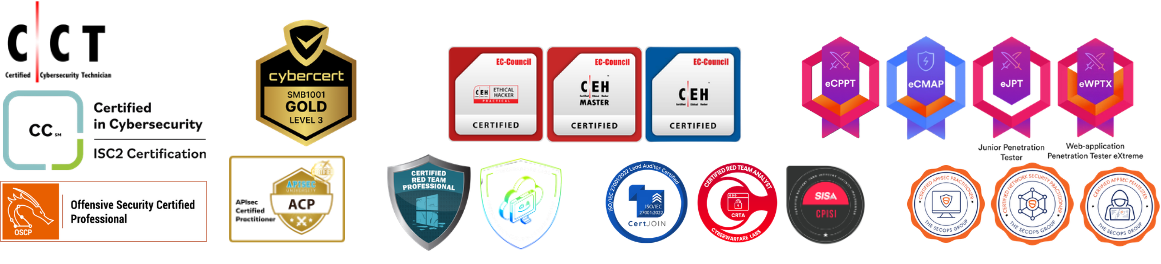
When a Sentry Cyber consultant tells you where your Essential 8 gaps are, that assessment is coming from a certified practitioner, not a sales rep working off a checklist.
A REAL CASE STUDY
How we traced a four-hour bank
fraud across seven institutions
A Melbourne-based accounting and tax firm called us after noticing unauthorised transactions on their bank accounts. They had no idea what had hit them. By the time we’d finished the forensic investigation, we’d reconstructed every step of a coordinated attack that had been quietly building for three weeks before the criminals struck.
The owner ran a normal small business, used a licensed antivirus, kept his passwords in a password manager, and used multi-factor authentication on his accounts. He did everything most people would call “sensible”. It wasn’t enough.

3 January
The attacker quietly used a remote desktop session to log into the workstation under a system account name. The session lasted 32 hours. Nobody noticed.
15 January
A malicious file disguised as a document editing tool was run on the device. This was the dropper that gave the attacker their persistent foothold.
19 January
The owner saw his screen go blank and watched files copy on their own. He panicked and turned the machine off. (This is the natural reaction. It’s also the wrong one but he didn’t know that at the time.)

22 January, 4:03am
The attacker installed AnyDesk remote desktop software. They now had full live control of the screen, keyboard and mouse.
22 January, 7:39am to 11:25am
In just under four hours, the attacker logged into Bendigo Bank, Westpac, Bank of Melbourne, ANZ, CommBank, Great Southern Bank, Western Union, Wise and PayPal. They added new payees, sent PayID transfers, viewed credit card details, and submitted a full personal loan application in the owner’s name.
10:44am
They created a hidden Gmail forwarding rule sending copies of every email to an outside address. Even after we kicked them out, they’d still see every reply.
10:53am
They reset the LastPass master password, locking the owner out of his own password vault. Every password stored in there was now in the attacker’s hands.
12:52pm
They restored the owner’s MetaMask crypto wallet using the seed phrase they’d pulled from the password manager. Full crypto wallet access.
6:58pm
They ran a Windows command to delete the system restore points. If we wanted to roll back the machine, we now couldn’t.
23 January 2026, 1:00pm
They installed a second remote access tool (ScreenConnect) as a backup, in case the first one got removed.
HOW WE HELPED
We took a forensic image of the device using a write-blocker so the evidence couldn’t be altered, then reconstructed the attack timeline from Windows event logs, prefetch records, and browser history. We produced a detailed investigation report that the client used to:

Support their bank fraud disputes (specifically the Bendigo PayID transfer)

Make a formal ReportCyber submission referred to Victoria Police

Assess their notifiable data breach obligations under the Privacy Act

Plan a clean rebuild of the workstation with proper endpoint protection

Rotate every compromised credential, wallet seed, and account
If something doesn't feel right, talk to us.
The complimentary CISO meeting takes 30 minutes. There’s no obligation
and no sales pitch. You’ll come off the call with a clear picture of what
you’re dealing with and the next three things you should do. That’s it.


FAQS
Frequently Asked Questions
What does the complimentary CISO meeting cover?
We’ll listen to what’s happened, ask the questions we need to scope the incident, and give you a clear next-step action list. If it turns out you don’t need our paid services, we’ll tell you. The meeting runs for around 30 minutes.
How fast can you start?
For urgent incidents we can usually be on a video call within an hour during business hours. After-hours and weekend response is available for existing clients and on a case-by-case basis for new ones — call 1800 526 269 and we’ll work something out.
Do you only work with Google Workspace?
No. Google Workspace is our specialty since 2010, but we handle Microsoft 365 environments, Windows and Mac devices, and the major SaaS platforms.
Will your investigation report be accepted by my bank or AFCA?
Yes. Our reports are written to a standard suitable for external dispute support, including bank fraud disputes, AFCA submissions, and insurance claims. We can also provide expert witness statements and attend meetings with bank fraud teams if required.
Do I need to come to your office?
Not for the consultation. The first meeting is by video call. For forensic device imaging we either collect the device, ship a write-blocker to you, or visit on-site for Melbourne clients.
It depends entirely on the scope. A simple inbox compromise investigation is much smaller than a multi-device, multi-account incident. We always quote in writing before we start, and you decide whether to proceed.
I’m not sure if I’ve actually been hacked. Should I still call?
Yes. A 10-minute conversation will usually tell us if it’s a real incident or a false alarm. We’d much rather you call us early about something that turns out to be nothing than call us late about something that turns out to be serious.